
How to Add a User to Google Analytics 4 (GA4)
Giving access to your Google Analytics account is a simple but important step when working with an SEO or web development partner.

By adding users directly, you keep ownership of your data while allowing your team to view reports, make updates, and optimize performance.

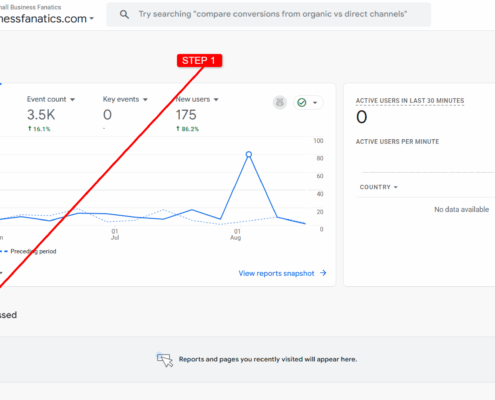
Here’s a quick guide with screenshots showing exactly how to add a new user in Google Analytics 4:


Google Analytics Admin menu screenshot

Google Analytics Admin menu screenshot


Step 1: Open Admin Panel

Log in at analytics.google.com and click the gear icon ⚙️ in the bottom-left corner. This takes you to the Admin settings where account access is managed.


Google Analytics account access management screenshot

Google Analytics account access management screenshot


Step 2: Go to Access Management.

Select Account Access Management. This is where you can securely add our team without giving up ownership of your account

.

Google Analytics add new users screenshot

Google Analytics add new users screenshot


Step 3: Add a New User

Click the blue plus button in the top-right and choose Add users. This is how you’ll send us an invitation.


Google Analytics add user roles and permissions screenshot

Google Analytics add user roles and permissions screenshot


Step 4: Assign Role & Invite

Enter jl@smallbusinessfanatics.com, choose Administrator, then click Add. We’ll get an invite instantly and can begin helping you track and optimize your site.


That’s it! The new user will receive an email invitation and have access right away.

If you’re a client of Small Business Fanatics, you can add my email jl@smallbusinessfanatics.com anytime so we can help manage, monitor, and optimize your website performance.

👍 Creative Ways to Get Google Business Profile Reviews

Getting more Google reviews is not about luck. It is about timing, consistency, and making the process easy for the customer. Most businesses do not have a review problem. They have a system problem.

If you want more reviews, better local visibility, and stronger trust with potential customers, you need a process that works every time. The good news is that you do not need to overcomplicate it. A few smart adjustments can turn review collection into a repeatable part of your business.

Quick wins you can apply today:

  • ask right after a successful job or service
  • send a direct review link instead of instructions
  • use text messages whenever possible
  • train your team to ask every time
  • make review requests part of your normal process

Why most businesses fail to get reviews

Most businesses wait too long, forget to ask, or make customers do too much work. A customer may leave a service appointment feeling happy, but by the next day they are already focused on something else.

That means your timing matters. So does convenience. If your customer has to search for your business, log in, figure out where to click, and remember what to say, you are creating friction.

Friction kills response rates.

The businesses that consistently earn reviews are usually doing three things well. They ask at the right moment, they send the customer directly to the review form, and they repeat the process every single time.

Below are practical ways to get Google reviews that actually work:

1. Ask at the moment of satisfaction

The best time to ask for a Google review is immediately after a positive experience. That could be after finishing a service call, completing a project, solving a problem, or helping a customer make a purchase.

This works because the customer is already satisfied and emotionally engaged. If you wait too long, that momentum disappears.

Keep the ask simple and natural. You do not need a speech. You just need a short, confident request.

Example: “Thanks again. If you have a minute, would you mind leaving us a quick Google review? It really helps.”

The more your business gets comfortable asking in real time, the easier it becomes to generate a steady stream of reviews.

2. Send a direct Google review link

One of the easiest ways to improve review conversions is to remove every unnecessary step. Do not ask customers to search for your business on Google and figure it out on their own. Send them directly to the review form.

This matters more than most businesses realize. Every additional click or moment of confusion lowers your chances of getting the review.

A direct link makes the process feel fast and effortless. It also shows that your business is organized and serious about customer feedback.

Once you have your Google review link, save it somewhere easy to access so you can reuse it in texts, emails, invoices, thank you pages, and follow-up messages.

3. Use SMS instead of email whenever possible

Email still has value, but text messages usually perform better for review requests. They are seen faster, opened more often, and feel more personal.

Most people are not excited to sort through their inbox, but they will usually read a short text within minutes. That makes SMS one of the most effective ways to request reviews from happy customers.

Keep the message short and direct.

SMS template:

hey [name], appreciate your business today. if you have 30 seconds, this helps us a ton:
[review link]

That is enough. No long explanation. No clutter. Just a polite request and a direct link.

4. Make review requests part of your workflow

If asking for reviews depends on memory, it will never happen consistently. The fix is to build review requests into your normal workflow so they happen automatically or by habit.

That could mean sending a request:

  • after a completed service
  • after an invoice is paid
  • after a support issue is resolved
  • after a successful customer interaction

The goal is to make review generation part of your business operations instead of a random extra task.

This is also where a solid WordPress maintenance process can help. When your website and backend systems are managed properly, it becomes easier to connect forms, follow-ups, automations, and conversion points into one smoother workflow.

5. Add review requests to your website

Your website should not just sit there looking nice. It should support your efforts to build trust and generate more leads. That includes helping you collect more Google reviews.

You can place review requests in strategic spots such as:

  • thank you pages
  • contact form confirmations
  • post-purchase pages
  • customer support pages
  • footer calls to action

Done right, this gives engaged users another easy chance to leave feedback while your business is still fresh in their mind.

If your site is not currently built to support conversions like this, stronger web design can help turn it into a more useful business asset instead of just an online brochure.

6. Train your team to ask every time

If you have employees or staff interacting with customers, they need to be part of the review process. One of the biggest missed opportunities in local SEO is having great customer interactions every day but never asking for reviews.

The fix is simple. Train your team to ask naturally, confidently, and consistently.

They do not need a script that sounds robotic. They just need to understand when to ask and how to make it feel casual.

For example, after a positive conversation or completed service, they can say:

“If you were happy with everything today, we would really appreciate a quick Google review.”

When everyone on the team understands that reviews matter and knows how to ask, review growth becomes much easier to sustain.

7. Use email as a secondary follow-up channel

Email can still work well, especially when it is used as a follow-up rather than the first request. If a customer does not respond to a text or if email is your only contact method, keep the message short and personal.

Email template:

subject: quick favor

hey [name],

if you had a good experience, would you mind leaving a quick google review?
here’s the link: [link]

appreciate you,
[business name]

Avoid overwriting these messages. The customer does not need a long explanation. They need a clear ask and an easy way to complete it.

8. Use QR codes for in-person review requests

If you run a local business, QR codes can be a smart way to capture reviews from customers while they are still on site. This works especially well in physical locations where customers are already standing at a counter, waiting in a lobby, or wrapping up a service.

You can place review QR codes on:

  • front desk signs
  • receipts
  • business cards
  • menus or tabletop cards
  • checkout or waiting areas

The key is to keep the instructions simple and the destination direct. The less your customer has to think, the more likely they are to leave the review.

9. Display reviews to generate more reviews

Reviews create momentum. When people see that your business is already getting consistent feedback, they are more likely to contribute their own.

This is a form of social proof. It builds trust, reinforces quality, and shows that your business is active and credible.

You can display reviews on:

  • your homepage
  • service pages
  • landing pages
  • sales pages
  • thank you pages

This not only helps with conversions, it also supports your overall SEO strategy by improving trust signals and user engagement across your site.

10. Automate the process wherever possible

Manual review requests can work, but they usually break down over time. People get busy. Staff forget. Follow-ups never happen. That is why automation is one of the smartest long-term moves.

A basic review automation process might look like this:

  • service is completed
  • customer is marked as finished in your system
  • an SMS is sent within 5 to 30 minutes
  • an email follow-up is sent the next day if needed

This creates consistency without relying on memory. It also helps you collect reviews at a much steadier pace, which is better for long-term local visibility than occasional spikes followed by silence.

How reviews help your business beyond SEO

Google reviews do support local rankings, but that is only part of the benefit. Reviews also affect how many people click, how much they trust you, and whether they contact you at all.

When potential customers compare two businesses, they often make fast decisions based on review quantity, review quality, and how recent those reviews are. A business with strong recent reviews usually looks more trustworthy before a visitor even reaches the website.

That means reviews can influence:

  • local map visibility
  • click-through rates
  • lead quality
  • conversion rates
  • overall brand trust

In other words, reviews do not just help you rank. They help you win more business.

What not to do

There are right ways and wrong ways to get Google reviews. Some shortcuts may look tempting, but they can create problems for your profile and your reputation.

Avoid these mistakes:

  • offering discounts or rewards in exchange for reviews
  • asking only happy customers while filtering out unhappy ones
  • posting fake reviews
  • buying reviews from third parties

These tactics can lead to removed reviews, damaged credibility, or even suspension issues.

The better strategy is simple. Ask consistently, make the process easy, and earn honest feedback at scale over time.

FAQs about Google Reviews

Is it okay to ask customers for Google reviews?

Yes. Asking customers for reviews is normal and encouraged, as long as you are not manipulating the process or offering incentives.

How many Google reviews do I need?

There is no perfect number. What matters most is staying active and continuing to earn reviews over time. In many cases, consistent review growth matters more than a one-time surge.

Do Google reviews help local SEO?

Yes. Reviews can influence local trust, click-through behavior, and visibility in Google Maps and local search results.

Should I use email or text message?

Text message usually performs better because it is seen faster and feels more direct. Email still works well as a follow-up or backup option.

The long-term strategy that actually works

If you want more Google reviews, stop treating them like a random marketing task. Treat them like a business system.

The businesses that consistently win local trust do not just ask once in a while. They ask every time, remove friction, train their team, and automate what they can.

That creates a steady flow of fresh reviews, stronger visibility, and better conversion potential over time.

If your business is not generating reviews consistently, the problem is usually not your customers. It is your process.

Want help turning this into a system?

If you want a better process for generating reviews, improving visibility, and converting more visitors into leads, Small Business Fanatics can help.

We help businesses improve the technical side of growth through smarter websites, cleaner workflows, and stronger local SEO foundations.

  • review request integration
  • WordPress support and optimization
  • conversion-focused website improvements
  • SEO support for local visibility

If you want to improve the system behind your reviews, start with a free SEO audit.

SEO Tips for Small Businesses: How to Rank Higher in 2025

Learn the most effective SEO tips for small businesses to boost visibility, attract local customers, and compete online in 2025.

Call Now Button