
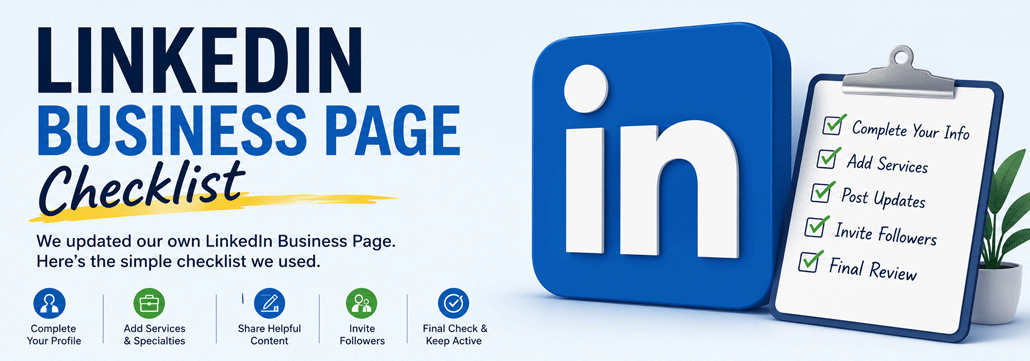
We Updated Our Own LinkedIn Business Page. Here’s the Simple Checklist We Used.
Updating a LinkedIn Business Page sounds easy until you actually log in and try to do it, right? That’s exactly what happened to us.

We knew our own LinkedIn Business Page needed attention after we updated our Social Media Profile checklist. Some information was missing. Some areas were outdated. A few sections were blank. And like many small business owners, we kept putting it off because it felt like one more confusing online task.

So we finally sat down, went through our own page, and fixed it section by section. This guide is based on that process.

Step 1: Start with the Basics

Where to go

Go to your LinkedIn Business Page, switch to Admin View, then click Edit Page. LinkedIn says page admins can edit company details from the page super admin view by clicking Edit page and choosing the relevant section.

What we updated

Start with the main company information such as:

  • Logo
  • Cover image
  • Tagline
  • About section
  • Website URL
  • Industry
  • Company size
  • Company type
  • Location

Why this matters

When someone lands on your LinkedIn Business Page, they should quickly understand who you are, what you do, and where to learn more. If the logo is missing, the cover image is outdated, or the about section is empty, the page can look neglected. That does not mean your business is bad, it just means the page is not helping you.

Keep it simple

Do not try to write the perfect about section right now.  Just add the facts first and you can improve the wording later. The goal of this step is simply to make the page look alive and complete.

Here’s a user-submitted question

What is the best cover image size for a LinkedIn company page?

  • recommended: 1128×191 pixels
  • file type: JPG or PNG
  • max size: 8 MB


LinkedIn business page setup infographic showing a 9-step checklist for creating and optimizing a professional LinkedIn Company Page.

Download the LinkedIn Business Page Checklist

Follow this simple 9-step visual guide to complete and optimize your LinkedIn Company Page with confidence.

Download Free PDF


Step 2: Add a Clear Button

Where to go

Go to Admin View → Edit Page → Buttons to enable the custom button and choose the button that makes the most sense for your business. LinkedIn’s own instructions say admins can add a custom button from Edit page → Buttons, then enter the button URL and save it.

What we updated

For most small businesses, the best button is usually Visit Website. Other options may make sense depending on your business, but “Visit Website” is the safest starting point. So that’s what we did.

Why this matters

If someone is interested in your business, make the next step obvious. Do not make visitors hunt for your website. Do not assume they will scroll around. Do not make them work harder than necessary. Give them one clear button to click.

Keep it simple

Use your homepage if you are unsure. If you have a better page, such as a services page, contact page, booking page, or consultation page, use that instead. The important thing is that the button works and sends people somewhere useful.


Step 3: Add Your Specialties

Where to go

Go to Admin View → Edit Page → Details → Specialties. This section lets you add keywords that describe your business.

What we updated

Instead of adding generic words like “Business” or “Marketing”, we listed the services we actually want to be known for. Our list included things like:

  • Technical SEO
  • WordPress
  • Website Design
  • Website Maintenance
  • Local SEO
  • Website Hosting
  • Website Audits
  • ADA Accessibility
  • Google Business Profile
  • Performance Optimization

You don’t need to copy ours verbatim. Use terms that accurately describe your own business.

Why this matters

Think of specialties as helping both people and LinkedIn quickly understand what your company does. If someone visits your page, they should immediately recognize whether you’re the right fit. If LinkedIn can better understand your business, that’s even better.

Keep it simple

Aim for 10-20 specialties. Don’t stuff in every keyword you can think of. If you don’t offer it, don’t list it.


Step 4: Feature Your Most Helpful Posts

Where to go

From your LinkedIn Business Page, click Start a Post. If your page is empty, don’t worry, we’ve all been there.

What we updated

Before inviting anyone to follow our page, we wanted visitors to see that the business was active. We published a few helpful posts covering topics we already answer for clients. Ideas include:

  • a quick tip
  • a common mistake customers make
  • a recent project
  • a before-and-after example
  • a frequently asked question
  • a client success story

Why this matters

Imagine walking into a retail store where every shelf is empty. That’s what a business page with zero posts feels like. People want to know your business is alive. They don’t expect daily content. They just want evidence that you’re active.

Keep it simple

Don’t overthink it. Three to five quality posts are far better than thirty low-quality ones. Your first few posts don’t need to go viral, they just need to be useful.


Step 5: Add Your Business Services

Where to go

Go to your LinkedIn Business Page admin area and look for the option to add services. LinkedIn says eligible Company Pages can add services from the page super admin view by selecting Create → Add services.

What we updated

We added the actual services we offer. Examples might include:

  • Web design
  • WordPress support
  • Website maintenance
  • Local SEO
  • Technical SEO
  • Website audits
  • Hosting support
  • Website security

Your list will be different, and that is totally fine. The point is to tell people what you actually do.

Why this matters

Many business owners assume visitors already understand their services. They usually do not. A potential customer may land on your LinkedIn page before they ever visit your website. If your services are missing, vague, or outdated, they may leave without realizing you can help them. Adding services gives visitors a quick overview of what your business offers.

Keep it simple

Do not write a full sales page for each service. One or two simple sentences is enough.

For example:

“WordPress website maintenance for small businesses that need help keeping their website updated, secure, and working properly.”

Clear beats clever.


Step 6: Follow Industry Hashtags

Where to go

Use LinkedIn’s search bar to search for topics related to your industry. Follow the hashtags that are most relevant to your business.

What we updated

We followed hashtags related to the work we actually do. For example:

  • #SEO
  • #WordPress
  • #SmallBusiness
  • #Marketing
  • #WebDesign

But your list will likely be different.

Why this matters

Following hashtags helps improve your LinkedIn feed. Instead of seeing random updates, you’ll begin seeing conversations from businesses and professionals in your industry. That gives you ideas for future posts and opportunities to engage with potential customers.

Keep it simple

Don’t follow hundreds of hashtags. Start with three to five. As your business grows, you can always add more. Remember, LinkedIn is about building relationships, not collecting hashtags.


Step 7: Invite Your First Followers

Where to go

From your LinkedIn Business Page, look for the Invite Connections option in the admin tools.

What we updated

After cleaning up our page, we finally felt comfortable inviting people to follow it. Before that, there wasn’t much to see. Now, visitors would find a complete profile, helpful posts, and a business that looked active.

Why this matters

Many business owners make the mistake of inviting everyone first and fixing their page later. We recommend doing the opposite. Think of it like inviting guests to your home. You’d probably tidy up before they arrived. Your LinkedIn Business Page deserves the same treatment.

Keep it simple

Start by inviting people who already know you, like:

  • friends
  • clients
  • referral partners
  • vendors
  • local business owners
  • former coworkers

You don’t need thousands of followers overnight. The first 100 genuine followers are far more valuable than 1,000 people who never engage.


Step 8: Publish a Few Helpful Posts

Where to go

From your LinkedIn Business Page, click Start a Post.

What we updated

Before inviting anyone to follow our page, we wanted visitors to see that our business was active. So we published a handful of helpful posts first. They weren’t sales pitches, they were simple posts answering common questions, sharing quick tips, and showing the work we do every day.

Why this matters

Imagine someone clicks on your LinkedIn page and the last post is from three years ago. It immediately makes the business feel inactive. You don’t need dozens of posts. Just 3-5 helpful updates is enough to show visitors your page is alive and worth following.

Keep it simple

If you’re not sure what to post, start with:

  • a quick business tip
  • a frequently asked question
  • a recent project
  • a customer success story
  • a behind-the-scenes photo


Step 9: Perform One Final Check

Before you call it finished

Take two minutes to review everything one last time. Here’s the same checklist we used on our own page:

✅ Complete every section you can
✅ Test your website link
✅ Make sure your logo and cover image look good on both desktop and mobile

Why this matters

Small mistakes are easy to miss while you’re making changes. A broken website link, blurry logo, or unfinished profile can leave the wrong impression. A quick final review helps make sure your LinkedIn Business Page is ready for customers, referrals, and future followers.

Keep it simple

Perfection isn’t the goal. A complete, accurate page that looks professional is far better than one that’s been “almost finished” for the last two years.


Printable LinkedIn Business Page Checklist

Print this page or keep it open while updating your business page.

Company Information

☐ Upload a logo

☐ Add a cover image

☐ Write a tagline

☐ Complete the About section

☐ Add your website

☐ Select your industry

☐ Update company size

☐ Choose company type

☐ Add your location

Business Information

☐ Add a custom button

☐ List your services

☐ Add your specialties

☐ Publish 3–5 helpful posts

☐ Follow a few industry hashtags

☐ Invite your first followers

Final Review

☐ Test every button

☐ Check your website link

☐ Review desktop and mobile

☐ Fix any typos

☐ Celebrate, you finally did it!!


Final Thoughts

If you’re anything like us, this probably stayed on your to-do list much longer than it should have. Not because it was difficult, but because life gets busy, clients come first, and updating your own business often gets pushed aside. That’s exactly why we created this guide.

We simply documented the updates we made to our own LinkedIn Business Page and turned them into a checklist anyone can follow. If this article helped you finally check one more thing off your business to-do list, then it accomplished exactly what we hoped.

Next up, we’re planning similar beginner-friendly guides for:

  • Google Business Profile
  • Facebook Business Page
  • WordPress websites
  • Google Search Console
  • Local SEO
  • AI business profiles

Because if we had to figure it out ourselves, there’s a good chance other small business owners are looking for the same answers.

Social Media Profile Checklist for Small Businesses (Updated 2026)

Your website may be the center of your online presence, but for many potential customers, social media profiles are where first impressions happen whether you like it or not.

If someone finds your business through Google Search, a referral, a review, or a shared post, there’s a good chance they’ll visit at least one of your social media profiles before deciding to contact you.

Unfortunately, many small business profiles are incomplete, outdated, or missing critical information. A missing website link, blurry logo, empty bio, or inactive profile can create doubt and cost you potential customers.

The good news is that optimizing your social media profiles is usually quick, inexpensive, and can significantly improve trust, engagement, and conversions.

In this guide, you’ll learn exactly what every small business social media profile should include, along with recommended image dimensions, file formats, and optimization tips for major platforms.

Why Social Media Profiles Matter

Think of your social media profiles as digital storefronts.

Many customers will check your Facebook page, LinkedIn profile, YouTube channel, or Google Business Profile before they ever visit your website. They want to know:

  • Are you a legitimate business?
  • Are you still active?
  • What services do you offer?
  • Where are you located?
  • How do I contact you?
  • Do other people trust you?

Well-maintained profiles help establish credibility while reinforcing your brand across multiple platforms.

They also support other marketing efforts including SEO services, local search visibility, referral traffic, and customer engagement.


Universal social media profile checklist showing the essential elements every small business profile should include.

The Universal Social Media Profile Checklist

Regardless of the platform, every small business profile should include the following elements.

#1 Business Name

Your business name should be consistent across your website, social media profiles, Google Business Profile, and online directories where you earn all those local citations.

Why does this matter?

Consistency makes it easier for customers to recognize your business and helps avoid confusion when they find you on different platforms.

For example, if your business is called Small Business Fanatics, try to use that exact name and spelling everywhere possible.

Inconsistencies can occur when different versions are used, such as:

  • SBF
  • Small Business Fanatics LLC
  • Small Business Fanatics Marketing
  • SmallBusinessFanatics
  • Small Biz Fanatics

Choose one version and use it consistently across your website, social media profiles, and business listings.

#2 Profile Photo

For most businesses, the best profile photo is a clean version of your logo.

If you’re a consultant, speaker, coach, freelancer, or personal brand, a professional headshot may perform better.

Your profile image should:

  • be easy to recognize at small sizes
  • have strong contrast
  • avoid tiny text
  • remain clear when displayed as a circle

#3 Banner or Cover Image

Your banner is valuable marketing real estate. And you can put anything on it to market your brand.

Instead of using a generic stock photo, consider including:

  • your primary services
  • your service area
  • a unique value proposition
  • your website URL
  • branded imagery

Many businesses waste banner space on decorative graphics that communicate nothing about the company.

#4 Website Link

Always link to your website whenever the platform allows it.

If you do not yet have a website, consider investing in a professional web design solution before spending heavily on social media advertising.

#5 Contact Information

Customers should never have to hunt for your phone number, email address, or contact form. This info should also be consistent on all platforms.

Be sure to include:

  • phone number
  • email address
  • website URL
  • contact page link
  • business address when applicable

If you’re actively seeking leads, make sure your contact information is accurate and easy to find.

#6 Business Description

Your bio should quickly answer four questions:

  1. who do you help?
  2. what do you do?
  3. where do you serve customers?
  4. what should people do next?

For example:

Small Business Fanatics helps small businesses improve their websites, SEO, hosting, and online visibility. Contact us today for a free consultation.

#7 Pinned or Featured Content

Many platforms allow you to feature content at the top of your profile.

Some of the best options include:

  • introduction post
  • customer testimonial
  • case study
  • special offer
  • popular service
  • recent success story


Example of a well-optimized business social media profile with profile image, banner, website link, contact information, and call to action.

PNG vs JPG: Which Format Should You Use?

One of the most common questions business owners ask is whether they should upload PNG or JPG files.


Image Type Best Format Reason
Logo PNG Sharper text and cleaner edges
Screenshot PNG Better text clarity
Banner with text PNG Improved readability
Photographs JPG Smaller file sizes
Team photos JPG Good quality and compression


In most situations:

  • Use PNG for logos and graphics.
  • Use JPG for photographs.
  • Keep image sizes as small as possible without sacrificing quality.


Social media image size cheat sheet with profile picture, banner, and post dimensions for major platforms.

Facebook Business Page Checklist

While some businesses have shifted their focus to newer platforms, Facebook remains one of the most important social networks for local businesses.

Customers frequently use Facebook to:

  • Read reviews
  • Check business hours
  • View photos
  • Send messages
  • Research local companies

What Every Facebook Business Page Should Have

  • Business name
  • Custom Facebook URL
  • Profile logo
  • Cover photo
  • Website URL
  • Phone number
  • Email address
  • Business hours
  • Service area
  • Business description
  • Call-to-action button
  • Recent posts
  • Photos of your work

Facebook Image Specifications

Element Recommended Dimensions Format Recommended Size
Profile Photo 1080 × 1080 px PNG Under 2 MB
Cover Photo 1640 × 624 px PNG or JPG Under 5 MB
Post Image 1200 × 630 px PNG or JPG Under 5 MB
Story 1080 × 1920 px PNG or JPG Under 30 MB


Facebook Optimization Tips

  • Use your logo as the profile photo.
  • Show your services in the cover image.
  • Add your website URL.
  • Enable messaging if someone monitors it.
  • Include real photos of your work.
  • Encourage customers to leave reviews.

If you’re trying to improve your local visibility, customer reviews can play a significant role. Here are some creative ways to get more reviews from happy customers.


LinkedIn Company Page Checklist

LinkedIn is one of the most underutilized platforms for small businesses.

While Facebook often attracts consumers, LinkedIn is where professionals, decision-makers, business owners, recruiters, and potential partners spend their time.

For service providers, agencies, consultants, and B2B businesses, LinkedIn can be one of the most valuable platforms available.

What Every LinkedIn Company Page Should Have

  • Company logo
  • Cover image
  • Website URL
  • Industry category
  • Company description
  • Services offered
  • Business location
  • Employee connections
  • Recent posts
  • Featured content

LinkedIn Image Specifications

Element Recommended Dimensions Format Recommended Size
Company Logo 400 × 400 px PNG Under 3 MB
Company Banner 1128 × 191 px PNG or JPG Under 3 MB
Personal Profile Photo 400 × 400 px PNG or JPG Under 8 MB
Personal Banner 1584 × 396 px PNG or JPG Under 8 MB


LinkedIn Optimization Tips

  • Use a professional banner that explains what you do.
  • Link back to your website and service pages.
  • Encourage team members to connect their profiles.
  • Share industry insights and company updates.
  • Highlight successful projects and client results.

Businesses investing in LinkedIn often benefit from broader digital marketing strategies, including search engine optimization, content marketing, and consistent website updates.


YouTube Channel Checklist

YouTube is one of the few social platforms where content can continue generating views, leads, and website traffic for years after publication.

Unlike many social networks where posts quickly disappear from feeds, YouTube videos can rank in both YouTube and Google search results.

Even if you never plan to become a full-time content creator, your business can benefit from publishing:

  • Frequently asked questions
  • Product demonstrations
  • How-to videos
  • Customer testimonials
  • Case studies
  • Behind-the-scenes content
  • Educational tips

What Every YouTube Channel Should Have

  • Professional profile image
  • Branded channel banner
  • Business description
  • Website URL
  • Contact email
  • Channel trailer
  • Featured video
  • Custom thumbnails
  • Organized playlists
  • Links to other social profiles

YouTube Image Specifications

Element Recommended Dimensions Format Recommended Size
Profile Picture 800 × 800 px PNG or JPG Under 4 MB
Channel Banner 2560 × 1440 px PNG or JPG Under 6 MB
Banner Safe Area 1546 × 423 px N/A N/A
Video Thumbnail 1280 × 720 px PNG or JPG Under 2 MB


YouTube Optimization Tips

  • Keep banner text within the center safe area.
  • Create consistent thumbnail designs.
  • Link to your website and service pages.
  • Add keywords naturally in titles and descriptions.
  • Use playlists to organize related videos.

Many businesses create excellent videos but forget basic optimization. Combining YouTube with a solid SEO strategy can significantly improve long-term visibility.


X (Twitter) Business Profile Checklist

X remains a useful platform for networking, industry discussions, customer communication, and sharing quick updates.

While it may not be a primary lead source for every business, it can help build authority and relationships within your industry.

What Every X Profile Should Have

  • Recognizable profile photo
  • Professional header image
  • Business bio
  • Website URL
  • Location or service area
  • Pinned introduction post
  • Consistent branding
  • Recent activity

X Image Specifications

Element Recommended Dimensions Format Recommended Size
Profile Photo 400 × 400 px PNG Under 2 MB
Header Image 1500 × 500 px PNG or JPG Under 5 MB
Post Image 1600 × 900 px PNG or JPG Under 5 MB


X Optimization Tips

  • Pin an introductory post.
  • Use industry-related keywords in your bio.
  • Share original insights rather than only reposting content.
  • Include links to relevant resources on your website.

If you regularly publish content, consider sharing articles such as your WordPress hacks guide or other educational resources to build authority.


Bluesky Business Profile Checklist

Bluesky continues to grow as an alternative social platform focused on conversations, communities, and content discovery.

While smaller than Facebook or LinkedIn, it presents opportunities for businesses willing to establish an early presence.

What Every Bluesky Profile Should Have

  • Business logo or professional headshot
  • Banner image
  • Business bio
  • Website URL
  • Location or service area
  • Introduction post
  • Consistent branding

Bluesky Image Specifications

Element Recommended Dimensions Format Recommended Size
Profile Picture 400 × 400 px PNG or JPG Under 2 MB
Banner Image 1500 × 500 px PNG or JPG Under 2 MB


Bluesky Optimization Tips

  • Keep banner designs simple.
  • Avoid placing important text near image edges.
  • Participate in industry conversations.
  • Share helpful content rather than promotional posts exclusively.

Businesses publishing educational content often see the best results when they consistently share useful information rather than sales pitches.


Instagram Business Profile Checklist

Instagram remains one of the strongest visual marketing platforms available to small businesses.

Service businesses, restaurants, contractors, retail stores, photographers, fitness professionals, and local brands can all benefit from maintaining an active presence.

What Every Instagram Profile Should Have

  • Business account
  • Profile image
  • Business category
  • Website URL
  • Contact information
  • Location information
  • Story highlights
  • At least 9 quality posts
  • Consistent visual branding

Instagram Image Specifications

Element Recommended Dimensions Format Recommended Size
Profile Photo 1080 × 1080 px PNG Under 2 MB
Square Post 1080 × 1080 px PNG or JPG Under 5 MB
Portrait Post 1080 × 1350 px PNG or JPG Under 5 MB
Story 1080 × 1920 px PNG or JPG Under 30 MB
Reel Cover 1080 × 1920 px PNG or JPG Under 5 MB


Instagram Optimization Tips

  • Use Story Highlights to answer common questions.
  • Show real projects, products, and team members.
  • Maintain a consistent visual style.
  • Use captions that educate and inform.
  • Include local references when appropriate.

Businesses with strong visual content often benefit from pairing Instagram efforts with quality website design and landing pages that convert visitors into customers.


Next, we’ll cover Google Business Profile, TikTok, profile bio formulas, pinned content strategies, common mistakes, and a complete social media profile audit checklist.


Google Business Profile Checklist

If your business serves customers locally, your Google Business Profile may be more important than every social media profile combined.

Your profile appears in Google Search, Google Maps, local search results, and often becomes the first thing potential customers see when researching your business.

A well-optimized profile can increase calls, website visits, direction requests, and leads without spending money on advertising.

What Every Google Business Profile Should Have

  • Correct business name
  • Primary business category
  • Secondary categories when appropriate
  • Website URL
  • Phone number
  • Business hours
  • Business description
  • Services or products listed
  • Service areas defined
  • Logo
  • Cover photo
  • Recent photos
  • Customer reviews
  • Responses to reviews

Google Business Profile Image Specifications

Element Recommended Dimensions Format File Size
Logo 720 × 720 px PNG or JPG 10 KB to 5 MB
Cover Photo 1024 × 576 px PNG or JPG 10 KB to 5 MB
Business Photos 1200 × 900 px PNG or JPG 10 KB to 5 MB


Google Business Profile Optimization Tips

  • Upload real photos instead of stock images.
  • Respond to every review.
  • Keep business hours accurate.
  • Add services and products.
  • Publish updates periodically.
  • Monitor customer questions and answers.

If you’re struggling to generate reviews, check out these creative ways to get Google reviews.

You should also make sure your profile is connected to your website and Google Analytics 4 for proper performance tracking.


TikTok Business Profile Checklist

TikTok has evolved beyond dance videos and viral trends. Many businesses now use TikTok to educate customers, showcase products, answer questions, and build brand awareness.

The platform rewards authenticity more than polished production quality.

What Every TikTok Business Profile Should Have

  • Recognizable profile image
  • Business username
  • Keyword-rich bio
  • Website link
  • Pinned videos
  • Consistent posting topics
  • Clear value proposition

TikTok Image Specifications

Element Recommended Dimensions Format File Size
Profile Photo 720 × 720 px PNG or JPG Under 10 MB
Video 1080 × 1920 px MP4 or MOV Follow TikTok limits


TikTok Optimization Tips

  • Answer customer questions on video.
  • Show behind-the-scenes content.
  • Create educational videos.
  • Keep introductions short.
  • Use captions for accessibility.


Simple Bio Formula for Any Social Media Platform

One of the most common mistakes small businesses make is writing vague bios that fail to explain what they actually do.

Your bio should answer four questions:

  1. Who do you help?
  2. What do you do?
  3. Where do you operate?
  4. What should someone do next?

Bio Template

[Business Name] helps [target audience] with [primary service] in [location or service area]. Visit our website or contact us to learn more.

Example

Small Business Fanatics helps small businesses improve their websites, SEO, hosting, and online visibility. Contact us today for a free consultation.


What Should You Pin or Feature?

Many platforms allow you to pin content or feature specific posts. Most businesses never take advantage of this feature.

Your pinned content should help new visitors understand who you are and what makes your business different.

Good Pinned Content Ideas

  • Business introduction
  • Customer success story
  • Case study
  • Frequently asked questions
  • Special offer
  • Most popular service
  • Best performing article
  • Video introduction

For example, you might feature your SEO tips for small businesses article or a recent customer success story.


Common social media profile mistakes including blurry logos, missing website links, incomplete bios, and inactive profiles.

Common Social Media Profile Mistakes

Even established businesses frequently overlook basic profile optimization.

Watch out for these common issues:

  • different business names across platforms
  • different logos on each profile
  • outdated phone numbers
  • broken website links
  • blurry profile images
  • empty bios
  • no call to action
  • no recent activity
  • missing service areas
  • generic stock banner images
  • no pinned content
  • ignoring customer reviews


How Often Should You Audit Your Social Profiles?

At a minimum, review your social profiles every quarter.

Check the following:

  • Business information
  • Phone number
  • Email address
  • Website links
  • Service offerings
  • Branding consistency
  • Image quality
  • Recent activity

Businesses that regularly update their profiles often create a stronger impression than competitors with outdated information.

Complete Social Media Profile Audit Checklist

Use this checklist whenever you review your profiles.

  • ☐ Business name is consistent everywhere
  • ☐ Logo is current and high quality
  • ☐ Banner image reflects current services
  • ☐ Website URL works properly
  • ☐ Phone number is accurate
  • ☐ Email address is current
  • ☐ Bio clearly explains the business
  • ☐ Service area is listed
  • ☐ Recent content has been published
  • ☐ Reviews are being monitored
  • ☐ Pinned content is relevant
  • ☐ Branding is consistent
  • ☐ Links point to the correct pages


Need Help Improving Your Online Presence?

Your social media profiles should work together with your website, SEO, reviews, analytics, and overall marketing strategy.

Explore our digital marketing services, request a free SEO audit, or contact us to discuss your business goals.


Final Thoughts

Social media profiles are often the first impression potential customers have of your business.

While every platform is different, the fundamentals remain the same: consistent branding, accurate information, professional imagery, useful content, and clear ways for customers to contact you.

You do not need to be active on every platform. Instead, focus on the platforms where your audience spends time and make sure those profiles accurately represent your business.

Combined with a strong website, quality content, customer reviews, and a solid SEO strategy, optimized social media profiles can help build trust, improve visibility, and generate more leads for years to come.

Call Now Button